The "max lifetime discount" setting puts a limit on the total dollar amount offered in discounts, through a given promotion, across all orders.
This helps you make sure that the amount stays within your budget for the event. Once the amount is reached, the promotion automatically becomes disabled.
How It Works
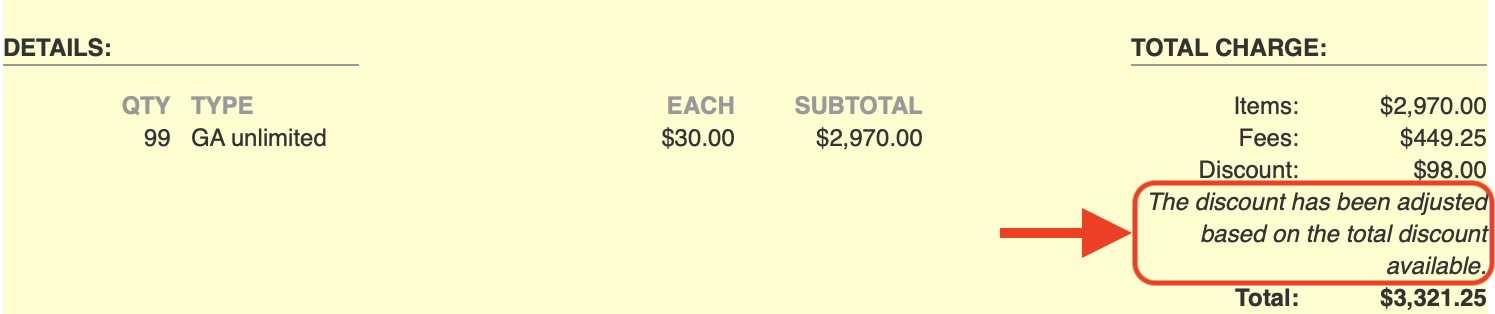
For each customer that redeems the promotion, once they click to the next page, the system reserves the appropriate amount from the total available.
If there isn't enough, they will be notified on the payment page that their order total has been adjusted.
If an order that used the discount becomes void, the amount will be added back into the total available.
However, this will not automatically re-enable the promotion if the total was already reached. In this case, you will need to manually re-enable it, so that the newly released amount can be redeemed by a different customer.
How to Use
Follow the instructions in Basic Promotion Setup, and use one of the following types:
Enter an amount in the Max Lifetime Discount field.
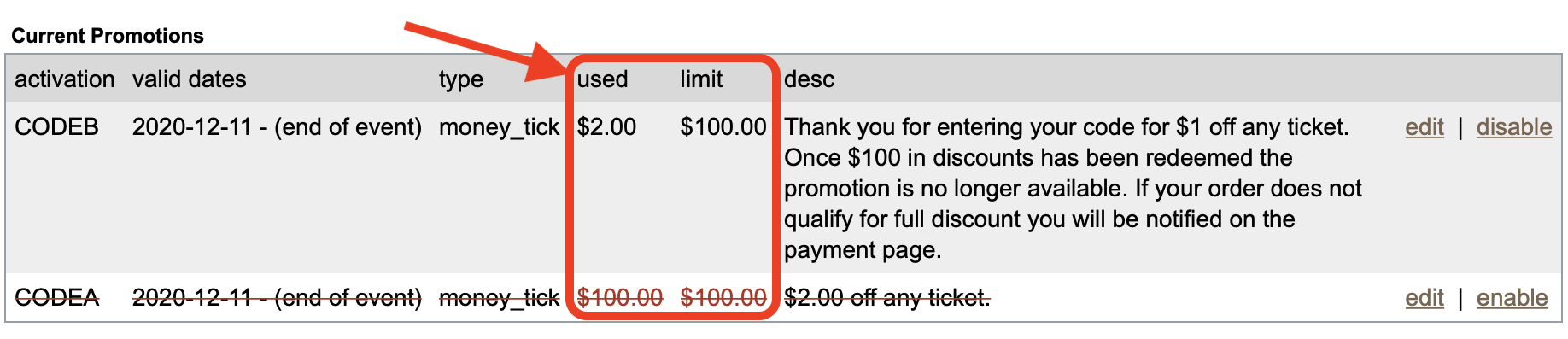
As customers redeem discounts, you can track the available total either on the Reports > Discounts, or in the list of current promotions on the Promotions page.
If you want to change the promotion after you create it, see: Adjusting Promotions
Notes
- Make sure the total is a multiple of the discount. (For example, don't set a maximum of $100 for a discount of $3; instead consider $99 or $102.)
- If you create a promotion, then you add a limit later, no previous orders that redeemed it will count toward the limit. It begins counting, from zero, at the time the limit is set.
- If you decide to increase the limit during sales, the total will keep counting as expected. However if the limit was already reached, you may need to re-enable the promotion.
- This feature is not available for '% Off Order' or 'Comp' promotions.